
How to Set Up a Google Business Profile for Your Concrete Lifting Company
 By: Josh Fulfer
Estimated Read Time: 7 Minutes
If You’re in the Concrete Lifting Business, This Is One of the First Things You Should Do
Your Google Business Profile isn’t just another online listing—it’s your company’s handshake with the local search world. When someone in your area types “concrete leveling near me” or “mudjacking in [your city],” Google pulls up a map with business profiles. Those top three results? They usually get most of the clicks and calls.
Getting ranked high there—and getting picked—comes down to two things: Visibility (SEO) and Trust (Conversion). More people seeing you + more people choosing you = Win-Win.
And it starts with getting your profile set up the right way.
Why It Matters So Much
Before people even land on your website, many of them will see your Google Business Profile (GBP) listing first. It shows your name, reviews, service area, contact info, photos, and more—all in a clean box on the search results page or Google Maps.
If it looks empty, inconsistent, or worse—if you don’t have one—you’re probably losing business to competitors who do show up and look trustworthy.
This is one of your most valuable digital assets, and it’s free. But there are right ways to do it—and wrong ways that can get you suspended or buried.
How to Set It Up (And Get Verified)
Go to google.com/business and hit “Get Started.” Use a Gmail or Google Workspace account tied to your business.
When entering your business name, do not keyword stuff. Don’t call yourself “Best Concrete Lifting in Springfield | Foam Experts”—just use your actual business name. Keep it clean and consistent with your website.
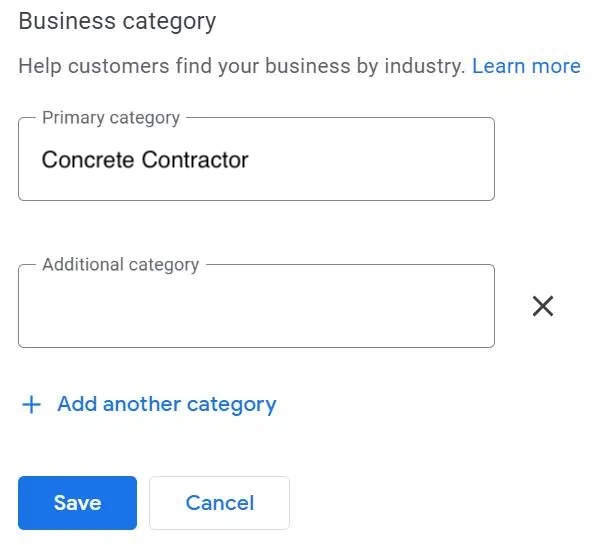 When selecting your category, choose “Concrete Contractor.”
Don’t pick generic options like “Contractor” or misleading ones like “Concrete Supplier.” If you also do waterproofing or insulation, you can add those as secondary categories later—but your primary should reflect your core service.
If you work from home, you can hide your address and list a service area instead. That’s completely fine. Just don’t list a residential address publicly—it’s against Google’s terms and can get flagged – so you can’t get a listing.
Verification Process
Google has cracked down hard on spam profiles, so they’re going to ask you to prove you’re a legitimate business. That often means:
- A live video call showing your truck, gear, business card, or signage
- A phone or text code sent to your actual phone line (no forwarding services like CallRail)
- Being on-site at your business address or in your work vehicle at a job
It might take a couple of tries. That’s normal. The key is to be patient, prepared, and make sure the information you enter matches your real-world setup.
After You’re Verified: Now the Real Work Begins
Having a profile is step one. Using it the right way—week after week—is what separates real pros from companies that fade into search results purgatory.
Google looks at how active and trustworthy your profile appears. That includes regular photo uploads, responses to reviews, and consistency across your business name, address, and phone number (NAP).
Consistent Posting = Better Visibility & More Conversions
Unlike Facebook, Google doesn’t have a post scheduler. That means if you want to post updates—photos from the field, short videos, new services—you’ve got to do it manually.
Ideally, build this into your job site process. Snap a quick photo after the lift. Record a 20-second clip explaining what you did. Clean it up slightly on your phone (brightness, crop, markups), and upload it from the field. If you have a team, give someone editor access to help with this.
Why post so often? Because it creates both SEO and conversion value.
Fresh posts and photos tell Google your business is active and relevant in your area. But more than that, it builds trust with the next person who’s looking you up. If someone scrolls through your listing and sees 15 fresh photos from recent jobs, they’re far more likely to call than if you have two old shots from 2021.
Photos with location data also help Google understand where you work. So if you post from multiple cities in your service area, your relevance spreads naturally.
Need help improving your photo process?
👉 Photo Best Practices for Concrete Lifting Companies
 Reviews: Quality, Not Just Quantity
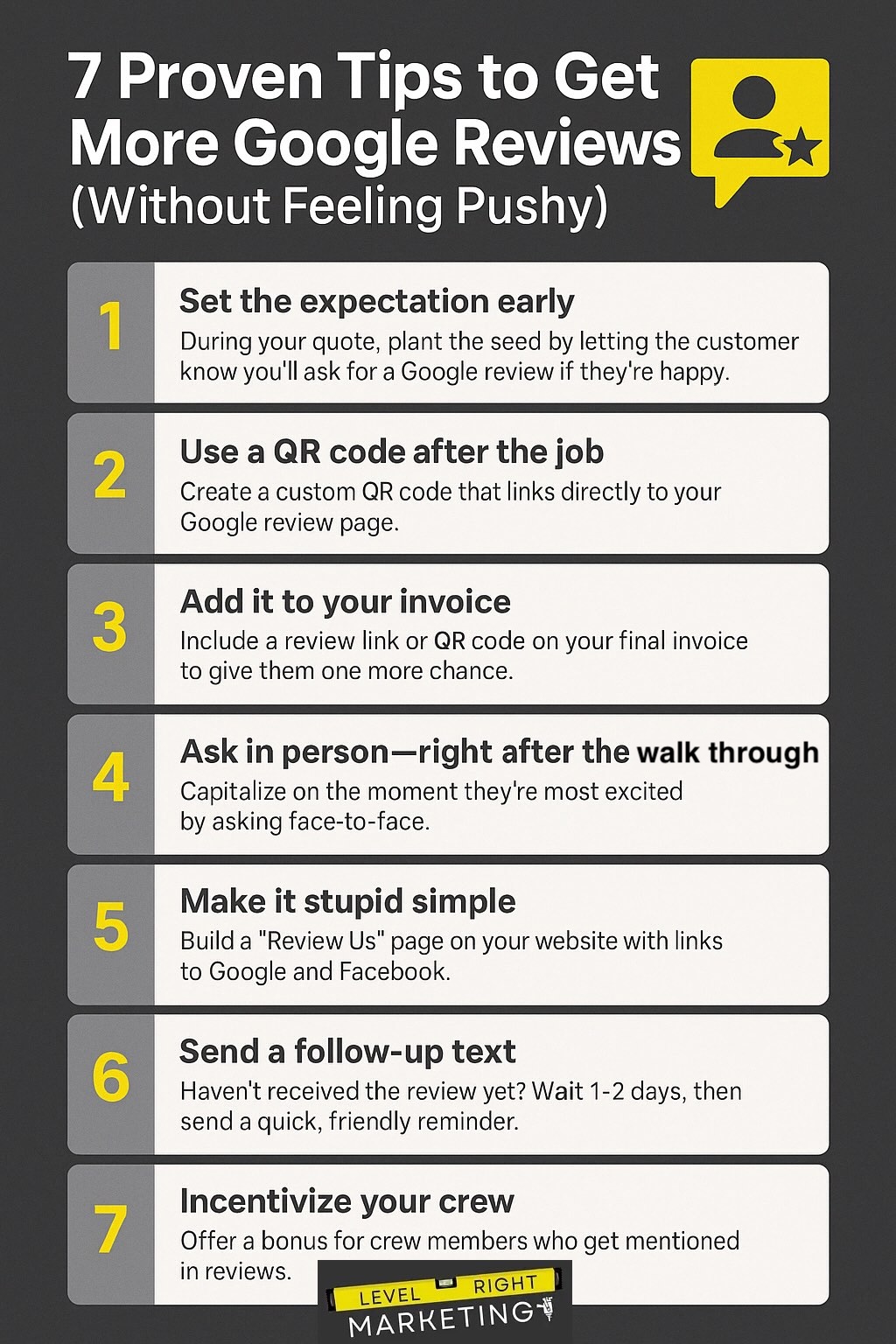
Reviews are huge for both rankings and conversions—but they have to look natural.
You don’t need 100 reviews overnight. In fact, that can raise red flags. Instead, aim for steady progress—try to get 10–15% of your customers to leave a review on Google or Facebook.
Make it part of your process. After each job, send a follow-up message with your review link and a quick thank-you. If they don’t have a Gmail account, send them to your Facebook page.
👉 How to Get More Reviews for Your Concrete Lifting Business
Other important points:
- Never review yourself
- Don’t pay for reviews
- Always reply professionally—future customers are reading
- Don’t copy and paste the same ask every time
Keep Everything Consistent (And Don’t Get Suspended)
Once your profile is verified, don’t fidget with it. Changing your business name, phone number, or address frequently is one of the fastest ways to get flagged.
If your page gets suspended, don’t panic—and don’t create a duplicate. Work with Google support to resolve the issue. Duplicates cause more problems than they solve.
This is a long-term asset. Treat it with the same care you give your website.
This Isn’t Set and Forget—It’s a Living Profile
If you want to outrank competitors, this is how to do it. If you want more of the people who find you to actually call, this is how to make it happen.
Your Google Business Profile supports both visibility (SEO) and conversions (trust). Most businesses fail at one or both. But if you’re even just a little more consistent—more real, more helpful—you’ll pull ahead.
Post once a week. Add photos from job sites. Share short videos. Reply to reviews. Keep showing up.
Even a 45-second clip shot on your phone can make an impact. It doesn’t have to be perfect—just present.
Final Tip: Use This Alongside Facebook
Once your Google profile is live and active, your Facebook page should back it up. These two tools work hand-in-hand to build trust and visibility online.