
Sitemaps, Crawling & Indexing | Concrete Lifting SEO Fundamentals
 By: Josh Fulfer
Estimated Read Time: 8 Minutes
How Google Finds (or Misses) Your Concrete Lifting Website
You can publish the best concrete lifting page in the world… and it can still sit there like it doesn’t exist.
Not because your work isn’t good. Not because your keywords are wrong. But because Google can’t reliably find the page, ‘crawl’ it, or ‘index’ it.
This lesson breaks down the difference between sitemaps, crawling, and indexing in simple terms—then shows you how to make sure your service pages, city pages, and blog posts actually become eligible to rank.
If you prefer a visual walkthrough, here’s a short video:
Quick Definitions: Sitemap vs Crawling vs Indexing
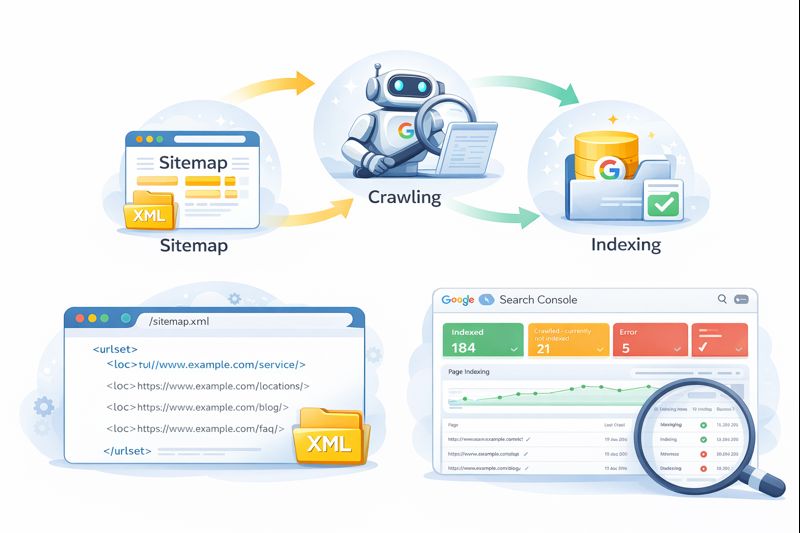 1) Crawling
Crawling is when Google’s bot visits your website and reads pages. Google discovers pages by following paths—mainly links.
If Google can’t find a path to a page (or it’s blocked), that page may never get crawled.
2) Indexing
Indexing is when Google decides to store your page in its database. If a page is not indexed, it cannot rank—period.
Important note: a page can be crawled and still not indexed.
3) Sitemap
A sitemap (usually an XML sitemap) is basically a list of the pages on your site. It helps Google discover what exists—especially new pages.
A sitemap is not a magic ranking button. It’s more like: “Hey Google, here are the pages you should know about.”
Why This Matters for Concrete Lifting SEO
Concrete lifting websites aren’t simple. The sites that win long-term usually include:
- Multiple service pages (lifting, leveling, void fill, trip hazards, etc.)
- Problem-area pages (driveways, sidewalks, garage floors, pool decks, warehouse slabs)
- City pages (and often dozens of them)
- Educational articles that answer homeowner questions
That’s a lot of pages. Which is good—because bigger, deeper websites tend to perform better. But only if Google can properly discover and index the content.
This ties directly into your overall content approach. If you haven’t read it yet, this is a helpful companion piece:
Concrete Lifting Website Content Strategy: What Pages Actually Drive Leads.
How Google Typically Discovers Your Pages
Google finds pages through a few main routes:
- Your XML sitemap
- Internal links (links from your pages to other pages on your site)
- External links (backlinks from other websites)
- Direct discovery (less common; usually still depends on links)
If your website has weak internal linking, pages can become “orphaned” (no clear path). If you want to see how we think about that system, this article is a good reference:
What Are Backlinks (And Why They Matter for Concrete Lifting SEO)
(it explains authority flow in a simple way).
What an XML Sitemap Does (and Doesn’t Do)
Your XML sitemap helps Google:
- Discover new pages faster (especially on newer or growing sites)
- Find pages that might not have strong internal linking yet
- Understand your site structure at a basic level
Your XML sitemap does not guarantee:
- Indexing
- Rankings
- Traffic
Think of it like a job list. Google still decides which “jobs” to do, which ones to store, and which ones to ignore.
Indexing: Why Google Sometimes Refuses to Index Pages
This is where most confusion happens. A concrete lifting business owner will say, “We published the page—why isn’t it ranking?”
Sometimes the page isn’t ranking because it’s competitive. But very often, it’s because the page isn’t even indexed.
Here are common reasons Google chooses not to index pages:
1) Thin or low-value content
If a page is short, repetitive, or doesn’t add anything unique, Google may decide it isn’t worth storing.
This comes up a lot with city pages when they’re templated too aggressively. City pages can be powerful—but only if they’re written with real value and real differentiation.
2) Duplicate content
If many pages look nearly identical, Google may index only a few and ignore the rest. This is one reason “copy/paste city pages” often fail long-term.
3) No internal links to the page
If nothing on your site points to a page, Google may never treat it as important. Pages that aren’t connected often don’t get prioritized.
4) Technical settings
Sometimes pages are blocked or discouraged by settings like:
- noindex tags (telling Google “don’t index this”)
- robots.txt rules (blocking crawling)
- canonical issues (Google thinks another page is the “real” one)
These aren’t “advanced SEO tricks.” They’re just settings that can quietly kill visibility if they’re wrong.
The Simple System: Sitemap + Links + Quality
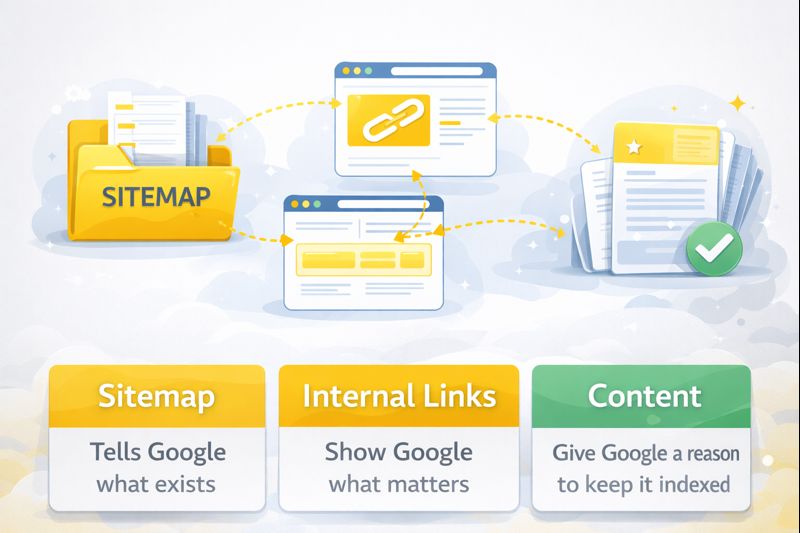
If you want the simplest way to think about this, it’s a 3-part system:
- Sitemap tells Google what exists
- Internal links show Google what matters
- Quality content gives Google a reason to keep it indexed
This is why “one-and-done SEO” doesn’t work well in local markets. Sites grow, pages get added, competitors publish content, Google changes how it evaluates pages.
If you want the bigger picture mindset behind that, this article ties in well:
Is SEO Ever Really Done? What Concrete Lifters Need to Know.
Where Sitemaps Live (and How Google Uses Them)
Most WordPress sites generate an XML sitemap automatically (often through your SEO plugin). The sitemap is usually found at a URL like:
- /sitemap.xml
- /sitemap_index.xml
Once you have a sitemap, the best practice is to submit it in Google Search Console. That’s Google’s dashboard where you can see indexing status and site health.
Google Search Console: The Most Practical Place to Monitor Indexing
If you manage or help manage concrete lifting SEO, Search Console is where you can answer questions like:
- Is Google discovering our new pages?
- How many pages are indexed?
- Are there crawl errors or blocked pages?
- Are important pages marked “crawled – currently not indexed”?
You don’t have to obsess over it daily. But checking it regularly is part of keeping your site healthy—especially as you add more pages.
Common Sitemap Mistakes We See on Concrete Lifting Sites
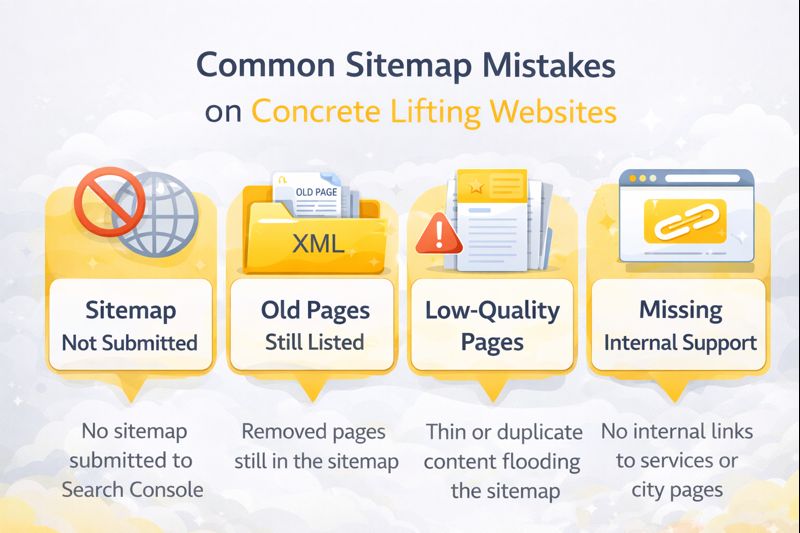
1) Sitemap not submitted
Google can still find your pages without submission, but it’s slower and less reliable—especially for newer sites.
2) Old pages still listed
If you delete or replace pages and don’t handle redirects properly, your sitemap can become messy. That can slow crawling and create confusion.
3) Low-quality pages flooding the sitemap
If the sitemap is packed with thin pages, it can dilute the overall quality signal. This is one reason “mass city page spam” backfires.
4) Important pages missing internal support
A sitemap alone is not enough. Key service pages should be linked from your homepage, navigation, related pages, and educational articles.
If you’re building out a deeper educational section, make sure you structure it like an FAQ and learning library, not random posts. This article can help reinforce that concept:
Why an FAQ Section Helps You Rank Higher and Win More Concrete Lifting Jobs.
What to Do When You Publish a New Page
When you add a new city page, service page, or blog post, here’s the simple checklist:
- Make sure the page is linked from at least 2–3 relevant pages (not just the blog archive)
- Make sure the page has a clear purpose and real value (not filler)
- Confirm it’s included in the sitemap
- Check Search Console over time to see if it gets indexed
Final Thoughts: If Google Can’t Index It, It Can’t Rank
This is one of the quiet fundamentals that makes everything else work.
Concrete lifting SEO is not just “write more blogs.” It’s building a website system that search engines can understand and homeowners can navigate. Sitemaps help discovery. Internal links guide priority. Quality content earns indexing and trust.
When your site is set up this way, new pages get discovered faster, indexed more reliably, and supported by the rest of your website—so your marketing compounds instead of resetting every month.