
Why & How to Post Updates on Your Google Business Profile
 By: Josh Fulfer
Estimated Read Time: 5 Minutes
Why Google Business Updates Matter
Most contractors set up their Google Business Profile (GBP) and never touch the Updates tab. Big miss. Fresh posts give Google and AI search more signals that you’re active and relevant. They also give homeowners proof—photos, quick wins, and reasons to call—without leaving Google.
- Rank better locally: Fresh, relevant content helps you show up in Search, Maps, and AI answers.
- Build trust fast: Real jobs, real photos, short explanations.
- Answer questions: Use keywords customers type (e.g., “driveway leveling near me”).
- Drive leads: Every post has a call-to-action. Use it.
What to Post (Keep It Simple)
You don’t need long write-ups. Think short, useful, visual.
- Project spotlights: Before/after of a lift with one sentence on the problem and the fix.
- Service highlights: Concrete leveling, joint sealing, warehouse floor lifts, pool decks.
- City/area posts: “Completed a patio lift in [City]” to catch “near me” searches.
- FAQ posts: “Can you lift a sinking driveway without replacing it?” (Yes—explain in 2 lines.)
- Safety wins: “Removed a trip hazard at the front walk—ready same day.”
How Often Should You Post?
Ideal: 1 post per week. Minimum: 2 per month. Consistency beats bursts. Batch a month at a time so it actually gets done.
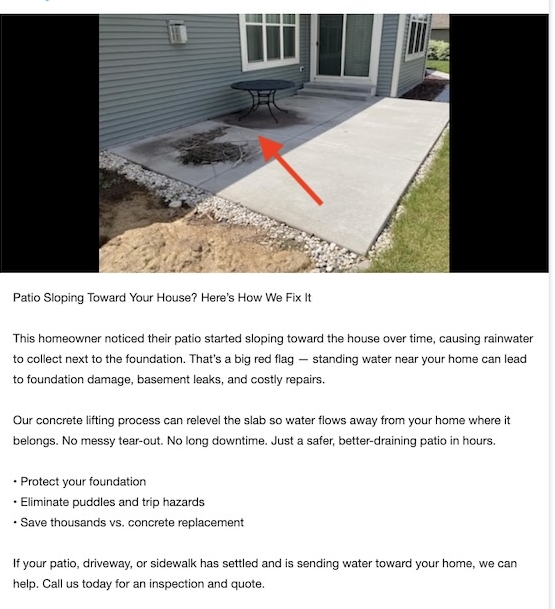
Sample Google Business Update Post
Post Template You Can Copy
Use this for most jobs—swap the details and photo.
Headline: Uneven Driveway? We Lift & Level Fast
Body: This driveway panel in [City] had settled and created a trip hazard. We lifted it back to level so the surface is smooth and safe—and it was ready to use the same day.
✅ Safer walking surface & curb appeal
✅ Costs less than replacement
CTA: Call now for an estimate.
10 Quick Ideas for This Month
- Driveway trip hazard before/after
- Patio sloping toward house (drainage fix)
- Sidewalk lift near school/busy foot traffic
- Garage slab settled at threshold
- AC pad relevel + why it matters
- Warehouse/retail interior floor lift
- Pool deck void fill + safety
- Joint sealing after lift (prevents washout)
- “What causes concrete to sink?” mini explainer
- “How fast can we do the job?” same-day angle
Pro Tips for Better Results
- Lead with a strong photo: Clear, well-lit, framed tight on the problem.
- Use location terms: Name the city/neighborhood in the first line.
- Keep it skimmable: One short paragraph + 2–3 bullets.
- Add a CTA button: “Call now,” “Request estimate,” or “Learn more.”
- Repurpose everywhere: Turn each post into a Facebook update and a short website blog.
Example From the Field
We recently posted a patio lift update similar to this:
Patio Sloping Toward Your House? Here’s How We Fix It
This patio settled and pushed water toward the foundation. We re-leveled it so water drains away—no tear-out, done in hours.
✅ Protects the foundation
✅ Eliminates puddles and trip hazards
✅ Saves money vs. replacement
Call today for an inspection.
SOP: Weekly GBP Posting Rhythm
- Pick 1 job from last week (best photo wins).
- Write a 3–5 sentence caption using the template above.
- Tag the city in the copy. Add a CTA button.
- Publish to GBP. Then paste the same content to Facebook.
- Drop the photo + caption into a simple blog post for your site.
- Ask the homeowner for a review and reference the post link.
Common Mistakes to Avoid
- Posting without a clear CTA.
- Generic captions with no location mentioned.
- Dark, zoomed-out photos where the problem isn’t obvious.
- Posting once, then going quiet for months.
Turn One Post Into More Content
Even a short lift video can power your marketing and training for months. For ideas on multiplying one clip across SEO, sales, and staff training, see: How Concrete Lifters Can Turn One Video Into SEO, Sales, and Staff Training Content.
Bottom Line
Google (and AI searches) favors businesses that show up with fresh, useful updates. Post weekly, keep it simple, show the fix, name the city, and ask for the call. Do that consistently and your profile becomes a steady source of leads—without extra ad spend.