How to Get Your Concrete Lifting Business Verified on ChatGPT
Homeowners are asking ChatGPT who to call about a sunken driveway. As of November 10, 2026, you can claim your business there, the same way you claimed your Google Business Profile years ago. It’s in beta, and almost none of your competitors have done it yet.
I just ran LevelRight Marketing through the whole process. It took longer than it should have, because two things tripped me up that nobody warns you about. Here’s what to have in hand before you start, and where the snags are.
What You’re Actually Claiming
OpenAI calls it Business Hub. Sign in to ChatGPT and go to chatgpt.com/business-hub. You claim or create a profile, confirm your business details, then pick a category and write a description ChatGPT can use when someone asks a question you’re a fit for.
Once you’re verified, your profile gets a blue badge. You can also see how often ChatGPT mentions your business and how many people click through to your website.
Two things it is not. It is not advertising, and you don’t have to run ads to claim your profile. And it is not a guarantee. OpenAI says claiming your business does not guarantee higher placement.
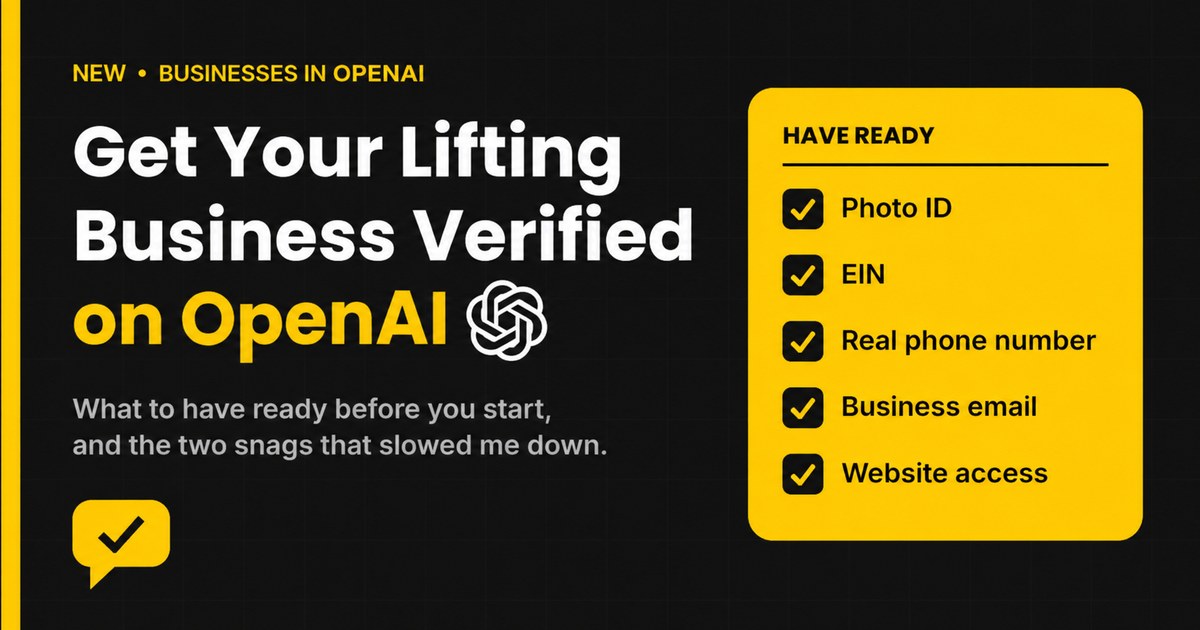
Have This Ready Before You Start
Get all of this on your desk first. Hunting for it halfway through is how a quick job turns into an afternoon.
| What you need | Why |
|---|---|
| Your driver’s license, state ID or passport | The identity check wants a government photo ID, and any of the three is supposed to work. My driver’s license failed over and over. My passport went through, so keep one handy if you have it. |
| Your EIN | The business details form asks for your tax ID. Keep your IRS letter handy so the name matches. |
| Legal business name and DBA | Enter them exactly as they appear on your registration, not the way you say them on the truck. |
| Business type | Sole proprietorship or an entity like an LLC. |
| A physical business address | P.O. boxes are not accepted. Have your registered address too if it’s different. |
| A real phone number | One that rings or texts straight to you. Call tracking numbers will not verify. |
| A business email you can open right then | You’ll get a code to confirm it. |
| Access to your website’s domain settings | You prove you own the site by adding a record to your domain. If a developer or web person manages it, reach out ahead of time and line up the timing with them. |
| Your cell phone | The ID check uses your phone’s camera. |
| A short description of your business | Your services and service area, in the words a homeowner would use. |
The Two Snags That Cost Me the Most Time
My driver’s license would not verify
The identity check runs through a company called Persona. You scan your ID with your phone’s camera. I tried my driver’s license multiple times and it failed every time. No clear reason given.
Then I tried my passport, and it went through. A driver’s license is supposed to be accepted, so yours may work fine. But if it kicks back, don’t keep fighting it. Grab your passport and move on.
Call tracking numbers don’t work
If the phone number on your website is a tracking number from a service like CallRail, it will not pass phone verification.
Use a direct line instead. I used my cell. If the only number you show the public is a tracking number, plan on using your real business line or cell for this step.
The Steps, in Order
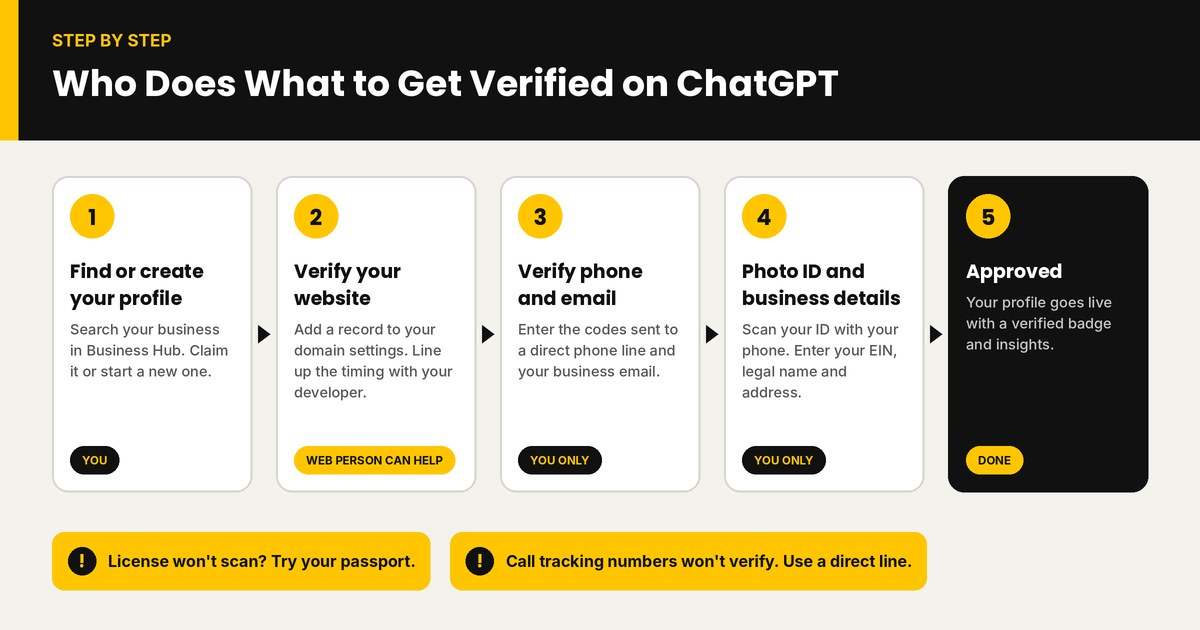
The order can shift a little depending on your business, but expect three separate verifications along the way: your website, your phone and your email. Then the ID check.
The website step is the only part your web person can help with. You may need to reach out to your developer and coordinate the timing as you work through it. The rest you have to do yourself. Your web person can’t do the ID check or take the phone and email codes for you, the same way they can’t verify your Google Business Profile for you.
- Find your business. Sign in to ChatGPT, open Business Hub and search your business name. If it’s there, claim it. If not, create a new profile.
- Say how customers reach you. You’ll choose between a physical location and a website. When Search Engine Journal tested it, creating a brand-new physical-location profile hit a waitlist, and the website route went straight through.
- Verify your website. ChatGPT gives you a TXT record to add to your domain’s DNS settings. Add it, wait for it to take effect, then come back and hit verify. If your developer handles your domain, send them the record and have them add it while you’re both available.
- Verify your phone and email. You’ll get a code for each. This is where a tracking number stops you cold.
- Pick a category and write your description. Say what you do and where you do it. “Concrete lifting and leveling for driveways, sidewalks and patios in the Madison area” beats a slogan.
- Answer the delivery and returns questions. They’re built for online stores and don’t fit a service business. Pick the closest answers and check the profile preview before you move on.
- Do the identity check and enter your business details. This is the photo ID, EIN, legal name and address part.
- Wait for approval. Check your business overview for the status. Search Engine Journal’s was approved almost right away.
What You Get Once You’re Approved
- A blue verified badge on your profile.
- Control over your information. You can update your business details instead of leaving ChatGPT to piece them together.
- Mentions and website clicks. You can see how often ChatGPT points people to your website and how many click through. A mention only counts when ChatGPT references your site, not just your name.
- Team access. You can invite other people to help manage the profile, each with their own ChatGPT login.
Will This Get You More Jobs?
Nobody can promise that yet, and I won’t. This launched days ago, and OpenAI is clear that ChatGPT still makes its own recommendations.
Here’s how I look at it. ChatGPT builds its picture of your business from a lot of places: your website, your Google Business Profile, your reviews, your listings around the web. This profile is one more source, and it’s one you control. If your name, address and phone number match everywhere, you’re easier to trust and easier to recommend.
It’s also early. The lifters who claimed their Google profile first had a head start on everyone who waited. This is the same kind of window, and right now it only costs you a little time.
Bottom Line
Claim your profile now, while most of your market hasn’t heard of it. Put your photo ID, EIN, a real phone number and your domain login on the desk, then work through the steps.
If you want a website built to get found on Google, Maps and AI search, book a Free Market Review.